Showing posts with label Utilities. Show all posts

Sunday, February 17, 2013

Decor8 Full Version


In Windows 8, Microsoft has provided a rather broad possibilities for personalization of the new interface: You can select one from their color schemes, as well as select one of the preset watermarks home screen. But to many, and this was not enough - set your own background image and create your own color scheme, you can run Decor8 from Stardock.

Wednesday, November 14, 2012

Pointstone System Cleaner 6.7


Pointstone System Cleaner - for removing the program from your hard drive space - temporary and log files, cookies and other files in the browser cache, etc. The program understands more than a hundred of extensions used to refer to temporary files, allowing you to automate the process of cleaning the hard disk from junk accumulate over time. On the other hand, can search and delete files with any other extensions. In addition, the program allows the removal of invalid entries from applet "Add / Remove Programs." Significantly, that System Cleaner allows safe disposal - without possibility to restore any utilities. The program has a simple and easy to use interface.

Key features:
- Restores performance and frees up space on your hard drive, maintain confidentiality, by cleaning up your personal information online, cleaning history, cache, clear the temporary files of Windows and Internet Explorer, clean junk files, garbage, etc.
- Scan for invalid shortcuts to the Start menu and desktop.
- Allows you to disable / delete records automatically load Windows.
- Backup data to a ZIP-file
- Cleaning the folders on your hard drive and Internet directories of debris and unnecessary files (temporary files, caches, etc.)
- Powerful file search.
- Ability to delete files in the Recycle Bin, or backup files in the ZIP-files or move files to a specific folder, or complete deletion of files - your choice.
- Scans multiple hard drives.
- Correction of errors on your system, which can reduce the performance of your computer.
- Accelerate your computer and improve performance.
- Customize and optimize the registry.
- Complete cleaning of computer data and Internet activity.
- Optimize system startup.
- Optimize landing system (shutdown).
- Setting the hidden parameters Windows.
- And more ...


Kerish Doctor 2012


Kerish Doctor 2012 - a complete solution to take care of your computer that contains the most promising developments in this field. Due to the unique system Kerish Doctor 2012 prevents Windows crashes in real time and securely fixes the registry. The application regularly produces the most perfect and safe cleaning system from accumulating digital "trash", as well as optimal increases productivity of its work.

Kerish Doctor 2012 protects your computer from malicious software and potential vulnerabilities, controlling important from the standpoint of security settings on your computer. Smart Update system time updates of the database applications that are regularly upgraded by our experts. With this system, the efficiency of the set of the complex increases from day to day, making it the most promising in its class.

Features :
The system of "Real-time Failure Detection" • Kerish Doctor 2012 has a unique system for detection and correction of Windows crashes in real-time "Real-time Failure Detection System". Disappearance of the desktop, the language bar, the critical error in the system settings are now controlled by the application. In combination with the regular bug fixes Registry does Kerish Doctor in 2012 the most complete set of troubleshooting and error Windows.
The system of "Intelligent PC Clean" • Kerish Doctor 2012 has the most perfect method of cleaning your computer "Intelligent PC Clean". Unlike most analog Kerish Doctor in 2012 when finding digital "trash" into account changes in the dates for each file. This prevents accidental deletion or re-use is still popular system for temporary files. This method ensures a reliable safe cleaning.
Accelerating Games "Game Booster" • Using the function "Game Booster" Kerish Doctor in 2012 helps improve the performance of gaming applications. When activated, Gaming Mode for a game suspended the work of non-critical services to free system resources. Set high priority to work directly process the game application. This allows the full potential of your computer during the game.
The function "Kerish Deblocker" • The "Kerish Deblocker" is designed to unlock the computer in cases where the user has no way to do it yourself. If your computer is blocked SMS-blockers or no opportunity to close the hung application, then hold for 10 seconds, press Escape, you activate Kerish Deblocker, which completes the process of the active window.
The function "Smart Update" • The "Smart Update" regularly update the kernel and a database application with access to the Internet. This allows to improve its performance in real time. This flexibility and expandability make Kerish Doctor in 2012 by one of the most promising products in its class. Database crashes and error is constantly being updated, the system is regularly updated.

Genuine Registry Doctor 2.5


Always troubled by the slow speeds, sudden crashes and a bunch of errors? Why not fix all the system errors and explore the vast potential of your PC and enjoy a more secure network environment? With Genuine Registry Doctor, you just need a couple of clicks to accomplish that! It diagnoses all your system's errors and gives you the most professional treatment. Thus you need not to take the pain to spend a large amount of money on fixing or reinstall Windows.

Program Features:
Solid scan and fix
Completely scan the entire system and diagnose problems of registry, privacy, junk files and system. Genuine Registry Doctor offers you a way to fix all the errors and optimize PC system.
Multi-functional
A number of built-in utilities, such as Startup Manager, Disk Cleaner, File Pulverizer, etc., strongly enhance the performance of Genuine Registry Doctor. You just need one small free app to own all the useful functions.

User-friendly
The very smooth download and installation, the clean and well-organized interface, the easy-to-understand navigation make Genuine Registry Doctor extremely easy to handle even for the novices.

100% free and safe
Genuine Registry Doctor would like to allow users to enjoy the free software, clean and safe PC environment. There is no adware, no spyware, no viruses in it, and it will never let you down.

Automatic protection
Genuine Registry Doctor makes all its efforts to protect your PC and your privacy under real-time protection by its smart automatic scan and sweep function.


CCleaner Pro and Business 3.24


CCleaner is the number-one tool for cleaning your Windows PC. It protects your privacy online and makes your computer faster and more secure. CCleaner is easy to use and a small, fast download and user interface has the modern look. CCleaner is a freeware system optimization and privacy tool. Removes unused files from your system – allowing Windows to run faster and freeing up valuable hard disk space. It also cleans traces of your online activities such as your Internet history. CCleaner can run from a USB thumbdrive and be installed/run on a computer without a complicated setup process. It is possible to specify files, folders and registry keys to ignore from the cleaning process. But the best part is that it’s fast (normally taking less than a second to run) and contains NO Spyware or Adware!

Cleans the following:
• Internet Explorer. Temporary files, history, cookies, super cookies, Autocomplete form history, index.dat files.
• Firefox. Temporary files, history, cookies, super cookies, download history, form history.
• Google Chrome. Temporary files, history, cookies, super cookies, download history, form history.
• Opera. Temporary files, history, cookies, super cookies, download history.
• Apple Safari. Temporary files, history, cookies, super cookies, form history.
• Other Supported Browsers. K-Meleon, Rockmelt, Flock, Google Chrome Canary, Chromium, SeaMonkey, Chrome Plus, SRWare Iron, Pale Moon, Phoenix, Netscape Navigator, Avant and Maxthon.
• Windows. Recycle Bin, Recent Documents, Temporary files, Log files, Clipboard, DNS Cache, Error Reporting, Memory Dumps, Jump Lists.
• Registry Cleaner. Advanced features to remove unused and old entries, including File Extensions, ActiveX Controls, ClassIDs, ProgIDs, Uninstallers, Shared DLLs, Fonts, Help Files, Application Paths, Icons, Invalid Shortcuts and more…
• Third-party applications. Removes temp files and recent file lists (MRUs) from many apps including Windows Media Player, eMule, Google Toolbar, Microsoft Office, Nero, Adobe Acrobat, WinRAR, WinAce, WinZip and many more

Changes in 3.24.1850 :
- Added Firefox Plugin and Extension management.
- Optimized architecture for 64-bit builds of Windows 7 and 8.
- Improved Firefox Aurora cookie cleaning.
- Improved Chrome Canary Saved Form Information cleaning.
- Added cleaning for AVG AntiVirus 2013, 4Sync, Copernic, DVDFab, Inkscape and PKZip.
- Improved cleaning for Windows MRUs.
- Faster automatic updating for Pro version.
- Minor GUI improvements.
- Minor bug fixes.

                                                                       Professional


                                                                            Business

Wise Care 365 Pro 2


Wise Care 365 is an all-in-one PC tune-up utility. It will keep your Windows secure, clean and fast. Wise Care 365 is a full collection of Wise Disk Cleaner and Wise Registry Cleaner. However, with other attractive and exciting features, it is far more than that. Wise Care 365 will keep your PC in tiptop shape and at peak performance! What you need to do is just one click when you use Wise Care 365. And your old PC will turn into a brand new and blazing fast one after Wise Care 365′s automatic cleanup and tuneup. Wise Care 365 can detect more hidden invalid registry issues than CCleaner, which is accredited by Gizmos and PCWorld. The scanning speed of Wise Care 365 is twice as fast as CCleaner, not to mention Advanced System Care Pro 5. All the features in Wise Care 365 are highly reviewed by PCWorld, PCAdvisor, ComputerBild, CHIP, CNET, ZDNet, and so on.

Wise Care 365 features:
• Clean up, defragment and optimize the Windows Registry
• Defragment and free up space on your hard disk
• Protect your privacy by erasing personal tracking data
• Recover lost files
• Hide important files or folders
• Prevent unauthorized use of personal applications
• Auto shut down your PC
• Free up Memory to boost game and enterprise software performance
• Simple “One Click Tune-up” option will optimize your PC


Advanced SystemCare Pro 6


Slow down, freeze, crash and security threats are over. Advanced SystemCare Free is a comprehensive PC care utility that takes an one-click approach to help protect, repair and optimize your computer. Advanced SystemCare is a very useful system tweak application. Scanning and finding what other utilities miss, it can keep your PC error-free and smooth than ever. This fantastic program is available free of charge.

Powerful Hard Drive Defragmentation High-speed Disk Defrag function to defragment hard drives up to 10 times faster than other defragmentation tools. Next-generation Registry Clean and Optimization Safely cleans registry junk, compacts registry bloats and defragment the whole registry for maximum performance.

Defends PC Security with Extra Protection Detect and analyze Windows security environment. Scans and removes spyware and adware using up-to-date definition files. Prevents spyware, hackers and hijackers from installing malicious items on your computer. Erases and updates your PC’s activity history. Quick and Extensive Clean-up for Hard Drives Boosts your system’s performance by cleaning missing files, destroying unwanted files, deleting obsolete files, and removing junk files. Supports clean-up of over 50 different types of junk files.

Speeds Up PC Performance and Internet Access Tunes up Windows by unleashing the built-in power of your system. Dramatically improves both system and Internet performance up to 400%. Fixes Multiple System Errors Does more than a registry cleaner, keeping your PC stable and running at peak efficiency. Repairs PC configurations by eliminating system bottlenecks and preventing crashes. Extremely Easy to Use Completes its work with just one click. Scans, repairs and gives personal care to your PC in one minute. 

Features:
# Scan and remove spyware and adware with the latest definition
# Prevent spyware, hijackers and bad websites from being installed
# Erase the history of all activities in your computer
# Scan and fix invalid and improper registry entries
# Detect and remove invalid startup items
# Search and Clean up unused Windows garbage
# Repair system configurations, Eliminate System Bottlenecks and Prevent Crashes
# Tune up Windows to improve both system and Internet performance, unleash the power of your Windows
# Analyze and Show detailed information of hardware and Windows
# Finish all Work with one click, Super Easy to Use

Advanced SystemCare Personal introduces a new way to maintain your computer: all work is done with one-click per day. With the advanced intuitive design and state-of-art computer technology, the user experience is made truly different.


Uninstall Tool 3.2


Uninstall Tool - Unique And Powerful Uninstaller. Make your Computer Work Faster Now by using Uninstall Tool! It's a fast, secure and convenient way to remove unneeded applications and system components. Great, powerful and reliable alternative to standard Windows Add/Remove program. The program has lots of features and options mising in Microsoft's applet. Uninstall Tool works with LIGHTNING SPEED and COMPLETELY removes any program from your computer.

Main:
- Revised and improved User Interface (including new icons)
- Secondary toolbar with addional functions (can be hidden)
- Adjustable positions of toolbars (top/bottom/side)
- Simplified and more convenient use of task panel (in the left of Uninstaller and Startup managers), added keyboard navigation for task panel controls
- Automatic check for updates (optional) and new version dialog with 'what's new' list
- Improved preferences dialog
- New HTML report (both for Uninstaller and Startup manager)
- Running different Windows Tools (Tools menu)
- Program preferences are always saved to the 'preferences.xml' file (located in CSIDL_APPDATA\CrystalIdea Software\Uninstall Tool)
- 90% of program code is rewritten/reviewed/optimized
- Improved program stability

Uninstaller:
- Uninstall Wizard: faster scanning
- Uninstall Wizard: detection of running processes among found traces; termination on request
- Better program listing, better icon detection
- Ability to force stop uninstall processes (when third-party uninstaller is freezed)
- Show recent items in the secondary toolbar (not in status bar) with grouping items (Apps/System/Hidden) in a popup menu
- Improved cache algorithms
- Improved search filter usage
- List view with small icons looks better now
- Google for program name (Ctrl+G) and its publisher (see 'Action' menu)
- Uninstaller cache is now saved to 'CachedData.dat' file (located in CSIDL_APPDATA\CrystalIdea Software\Uninstall Tool). One can manually refresh the cache by simply pressing the Refresh button in the toolbar (F5)

Startup:
- Multiple items selection
- Company column to display item's publisher/author
- Google for program name (Ctrl+G), .exe name and publisher (see 'Action' menu)
- Better way of handling situation when there're no items in the list


Zip Express 2.7


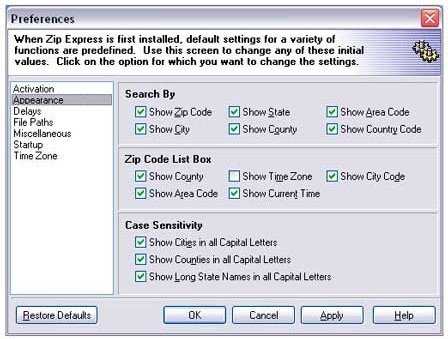
Zip Express allows easy look up of U.S. Zip Codes and their associated cities, states, counties, area codes, time zones and current time. Find the current time and time zone for cities around the world.

Save Time Paste Zip Code information directly into your Windows applications. Press a hotkey while in your word processor and a Zip Code entry box appears. Type in your Zip Code and the city, state and Zip Code are typed right into your word processor.

Countless Uses. Used by realtors, lawyers, university admissions counselors, call centers and many others. Use with your customer database.

Before returning a phone call, enter an Area Code or Country Code into Zip Express to determine where the caller called from and what time it is in their city or country.

With the Zip Code information displayed, press the Map button and, with an Internet connection, see a map of that location.


Wednesday, September 26, 2012

AVG PC TuneUp 2013


AVG PC Tuneup 2013 12.0.4000.108 With Serial Key/Crack/Patch/Keygen - 
With AVG


AVG PC TuneUp Pro 2013 your operating system, games and software again reached full capacity.
With AVG PC TuneUp you can perform important tasks such services as cleaning the hard drive
and registry, either automatically or manually. Disorder in the system and slow work remain in
the past. AVG PC TuneUp recognizes the existence of problems in your system and offers simple
solutions to address them. In addition, with AVG PC TuneUp you can completely change the
appearance of your Windows system to suit personal preferences.

The new interface is running AVG PC TuneUp offers a centralized development of all the
functions and capabilities of adjustment. The main area of ??the interface running AVG PC
TuneUp is divided into five categories, which are open to you fast and grouped by subject access
to the most important functions of AVG PC TuneUp.
Status and recommendations. In the category of state and recommendations you get an
overview of the current state of your system and recommendations on how to improve. Right
displays the protection status of your system.
Optimization of the system. Under "System Optimization" can disable or remove unwanted
programs and clean up your system and data.
Freeing up disk space. In the category of "Freeing up disk space" can systematically remove
unnecessary data from your system.
Troubleshooting. In the category of "Troubleshooting" you will find simple solutions to potential
problems.
Setting up Windows. Configuring Windows category offers you many opportunities to set up your
environment to suit your preferences.
Three modes to optimize your PC:
Saving mode. With "mode saves AVG" you can reduce your computer's power consumption by
deactivating the screen, hardware components, or unnecessary features.
Standard mode. Standard mode is turned on, if you do not include either "save mode", or "Mode
Turbo". Thus, it is a normal mode Windows.
Mode Turbo. With Turbo Mode, you can at any time to further increase the speed of your system
and customize it to suit your preferences.
Optimization of the system:
Deactivating programs
Deactivation Autorun
Removing Programs,
Live-configuration optimization
Cleaning the registry
Registry Defragmentation
Removing non-working shortcuts
Quick Start and shutdown
Defragment the hard drive
Freeing up disk space
Clean up your hard drive
Find and delete large amounts of data
Secure data deletion
Troubleshooting
Fixing common problems
Checking the hard drive for errors
Recover deleted files
Display and completion of ongoing processes
Displays information about the system
Configuring Windows
Customizing options and environment
Configure separate settings for Windows


                                                                          OR

                                                                Crack

Tuesday, September 25, 2012

Advanced PC Tweaker 4.2


                       Advanced PC Tweaker 4.2 

                        Release Date: 24.09.2012


Free Download Advanced PC Tweaker 4.2 Full Key/ Keygen/ Serial Number is the
diagnostic and maitainace tool with more than 15 functions to provide complete care and
boost performamce for your PC. It enhances your PC system by repairing problems,
cleanning junks, managing backups and optimizing system; it can also completely
uninstall unwanted programs, deeply optimize system memory and protect sensitive
information by completely removing all personal traces of Internet activities with our
result-oriented technology. In addition, Free Download Advanced PC Tweaker 4.2 Full
Key/ Keygen/ Serial Number offers great after-sales services to allow users submit
problems for professional advises. It is fully compatible with Windows 98, ME, 2000, XP,
Vista and 7. With the help of Advanced PC Tweaker, you can effectively and easily
improve system performance, customize Windows to personal preference, back up data
before any repairing, restore Windows system for different time and solve various PC
problems with a few clicks.


Increase Performance: As we all know, Windows system keeps becoming slower and
slower over time. Advances PC Tweaker offers several useful functions to prevent your

computer from slowing down. Registry Cleaner contains a total of 17 dedicated
categories for your registry scanning and detecting. By choosing the category you want,
the smart scanning engine will find out and list the detected problems that make your
PC’s performance unstable and insufficient and repair the problems, thus to boost PC
performance.
Maintain Windows: The Windows is a dynamic system that changes regularly every
time we use it, therefore, regular system maintenance will be necessary. Advanced PC
Tweaker’s 1-Click Tweak can automatically process system tweak at predefined time. To
keep your system in top shape at all times, you can also let Advanced PC Tweaker run at
Windows startup for detailed registry maintenance.
Free Up Disk Space: Even the largest hard disks will fill up someday if you store too
much information in it. Advanced PC Tweaker helps you scan and clean up the junk files
from your system to provide more space on your hard drives and allow applications to run
faster and more efficiently.
Customize Windows: This feature in Advanced PC Tweaker will help you customize
Windows to you personal favorite by changing the behavior of startup menu or taskbar.
Besides, Advanced PC Tweaker includes BHO(Internet Browser Helper Objects)
manager and IE Restore utilities to ensure a better and healthier internet experience by
blocking malicious plugins and restore Internet Explorer to sound performing states.
Solve Problems: Advanced PC Tweaker will repair your registry problems with only
several clicks as you can make choice on the listed items detected by the engine which
will automatically repair all the specified problems. In addition to the selection and
deselection operations, you can exclude any items to Ignore List where Advanced PC
Tweaker will reference and ignore the excluded entries at the next-time scanning. To
further protect your data, when you run Advanced PC Tweaker at the first time, it is
required to have a full backup on your registry files before any registry problems will be
fixed, which you can always use to recover the registry to a previous state.
Backup and Restore: Advenced PC Tweaker introduces powerful registry backup and
recovery management utilities, including repair backup and full backup, backup restoring
capability, restoring or deleting your backups, and the new feature Restore Point, which
will give you more leverage on ensuring the safety of your system during registry
repairing.
SystemOptimizing: facilitated by 5 major utilities, including System Optimizer, Block
ActiveX, Error Utilities, Register ActiveX, Optimize Memory, sophisticatedly enough to
tune up your system that will run at the optimal state
Uninstall Program: This built-in utility offers better and easier way for you to completely
uninstall any unwanted application that standard Windows Add/Remove program can’t
remove.
Submit Problems: This add-in goody can be used for submiting problems that can not
be solved or the unwanted programs can not be uninstalled successfully.


Password  ( If need) : www.daoudsoftwares.tk


Sunday, September 23, 2012

TuneUp Utilities 2013


As an advanced computer user, it’s difficult to keep the computer in shape, especially if you install and test applications on regular basis. That’s why you need to carry out a regular maintenance, just to be sure everything is in the right place and you won’t be assaulted by errors as soon as you start your computer.

In order to do so, you should probably take a look at TuneUp Utilities, an advanced software solution that could help you optimize your computer for the best performance. Still, it can do a lot more.

First of all, the installation procedure. Deploying TuneUp Utilities on your computer could take a while especially if you go for the Custom mode which will walk you through the whole process in order to select the elements you want for your app. It took only a few minutes in our case though, but in the end we got a perfectly configured software solution ready to keep our computer in shape.

The interface is the best you can get in this case. TuneUp Utilities is an incredibly complex application with tons of features and numerous tools for optimizing the computer, so an user friendly interface is a must have. And developers have managed to deliver it, presenting every single function in a very pleasant way. However, if you’re a beginner extra care is always recommended, not only because you could do something wrong, but also because TuneUp must be configured in the right way to get the best results.

All major tools are grouped into tabs, while the settings menu can be easily accessed from the top of the interface. Along with the optimization features, developers have also included a Windows Customization option so, besides cleaning the registry, removing broken shortcuts or accelerating the system shutdown, the user can also change the logon screen, the visual style or modify animations and effects. All of these from a single yet powerful interface.

TuneUp Utilities is, without any doubt, one of the best apps in this category, and paying 50 bucks for keeping your computer in shape for running at maximum speed isn’t so much of a bad deal.

Here are some key features of "TuneUp Utilities":

TuneUp Start page
:
· Intuitive Layout, Easy to Use
· Provides quick and easy access to the most critical optimization functions
· A single yet comprehensive appraisal of your PC's current performance and overall system health

TuneUp Speed Optimizer:
· Intelligent, Powerful Utility for any User Skill Level
· Easy optimization in just a few clicks
· Identifies unused programs and resource-draining functions
· Recommends tools for optimal PC performance

TuneUp 1-Click Maintenance:
· Automatic, Fast Optimization
· Enables one-click maintenance of the most important functions of your PC
· Cleans the Windows registry
· Deletes temporary files and folders
· Increases the system performance through integrated defragmentation
· Streamlines your desktop and simplifies folder shortcuts with one click

TuneUp Drive Defrag:
· Intelligent defragmentation with new progress display

TuneUp System Control:
· Supports Opera

TuneUp Uninstall Manager:
· Intuitive uninstall options

TuneUp Startup Manager:
· Increases the speed at the start-up of your PC

TuneUp Registry Cleaner:
· More powerful tool with in-depth view of your PC registry

Home Page - http://www.tune-up.com


Installation Note:
1. Please turn off your Antivirus because most of Antivirus detected Patch as a virus but it’s safe.
2. Install the soft normally. (Don’t run).
3. Extracted the Patch archive.
4. Copy Patch files into the installation directory.
5. Run and apply the Patch.
6. Enjoy the full soft.
7. Support the companies, which software you actually enjoy.


Password: hatemtai.com